How it works
From the first code to the first conversation.
Two apps, one shared setup, and a Safety Moment only when something matters. Here is what you will see, what your teen will see, and what happens in between, with the real screens.
- For teens 13–17
- Coverage varies by device
- Real app screens, sample data
you
your teen
Two apps, one setup
Each of you gets your own app. Neither is hidden.
you
Vettly Family
The parent app, listed as Vettly Family in the App Store and Google Play. Your teens’ status, Safety Moments, Conversation Coach, and the controls.
your teen
Vettly Companion
The teen app. It shows which checks are active, lets them check messages, links and people themselves, and gives them ways to share a concern or ask for help.
optional, for iPhone families
Mac Bridge
A Mac app that checks a Finder backup your family selects for iMessage safety signals. It is not live iMessage monitoring, and it is never required.
The walkthrough
Six steps, both phones in view.
Each step shows the screen the way it looks in the app, with sample data, and says what each of you sees at that point.
01
Both phonesStart with a conversation. Then install the apps.
Tell your teen what Guardian is and why you want it. Then you install Vettly Family, which is the Guardian parent app in the App Store and Google Play, and add a profile for your teen. They install Vettly Companion on their phone.
Your teen is part of setup from the start. There is nothing to find later.
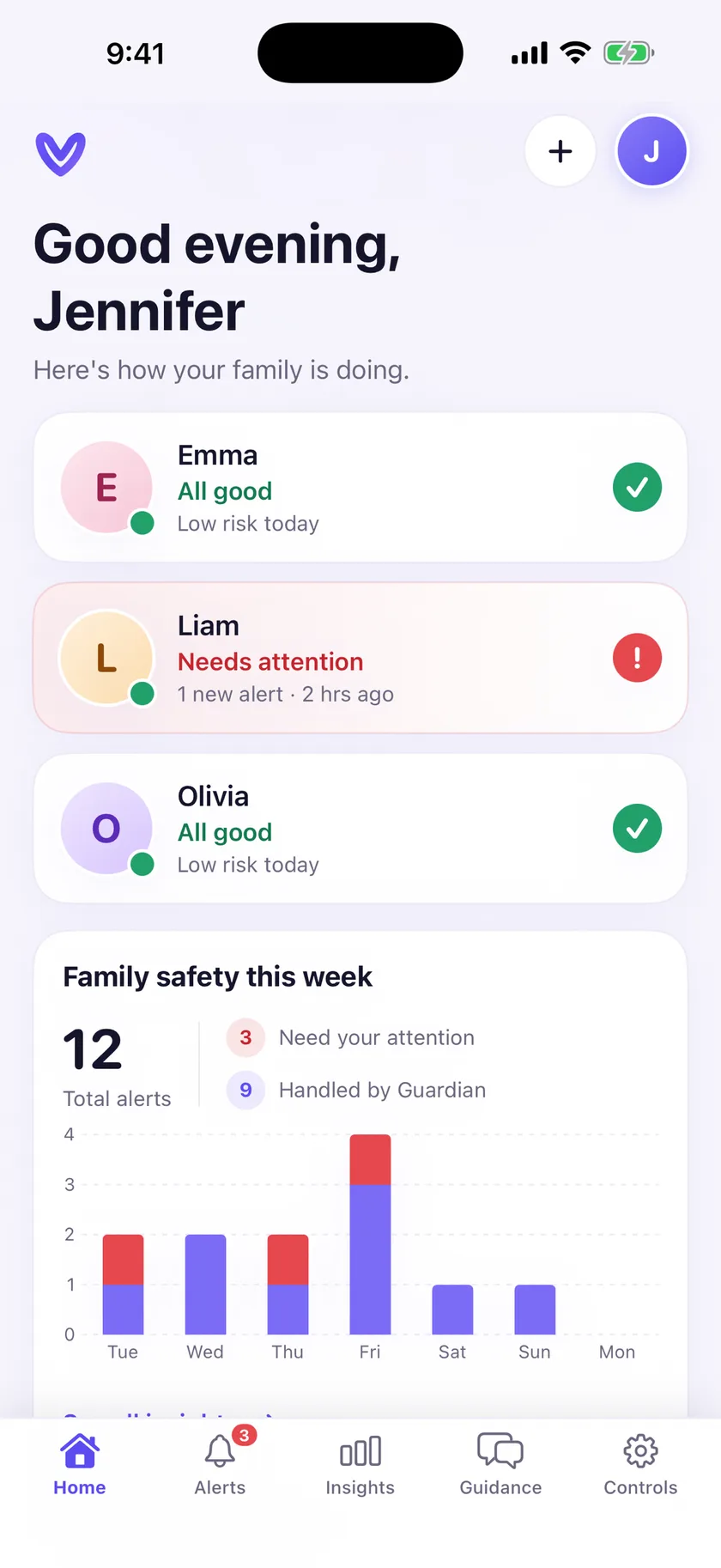
- You seeVettly Family, with a home screen that shows each teen’s status at a glance.
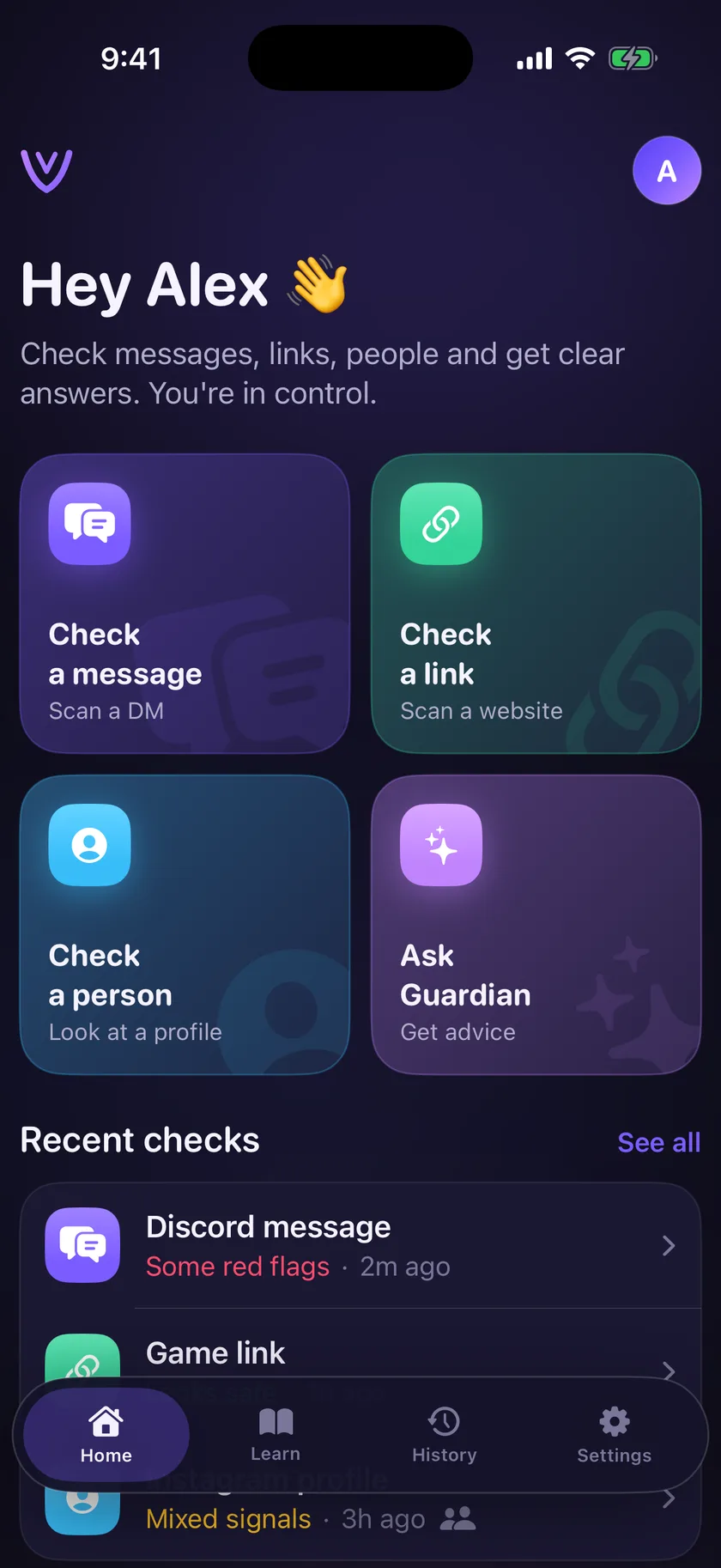
- Your teen seesVettly Companion, their own app with its own tools, not a hidden agent.
Vettly FamilyHome. Each teen’s status and this week’s Safety Moments. Sample data. 02
Your teen’s phonePair together, with permission.
Your teen enters the short invite code from your Vettly Family app into Companion. Nothing turns on until you approve their phone from your side.
- You seeA request to approve the phone, so you know exactly which device is paired.
- Your teen seesThe invite screen, which says in plain words that their parent approves the phone before anything turns on.
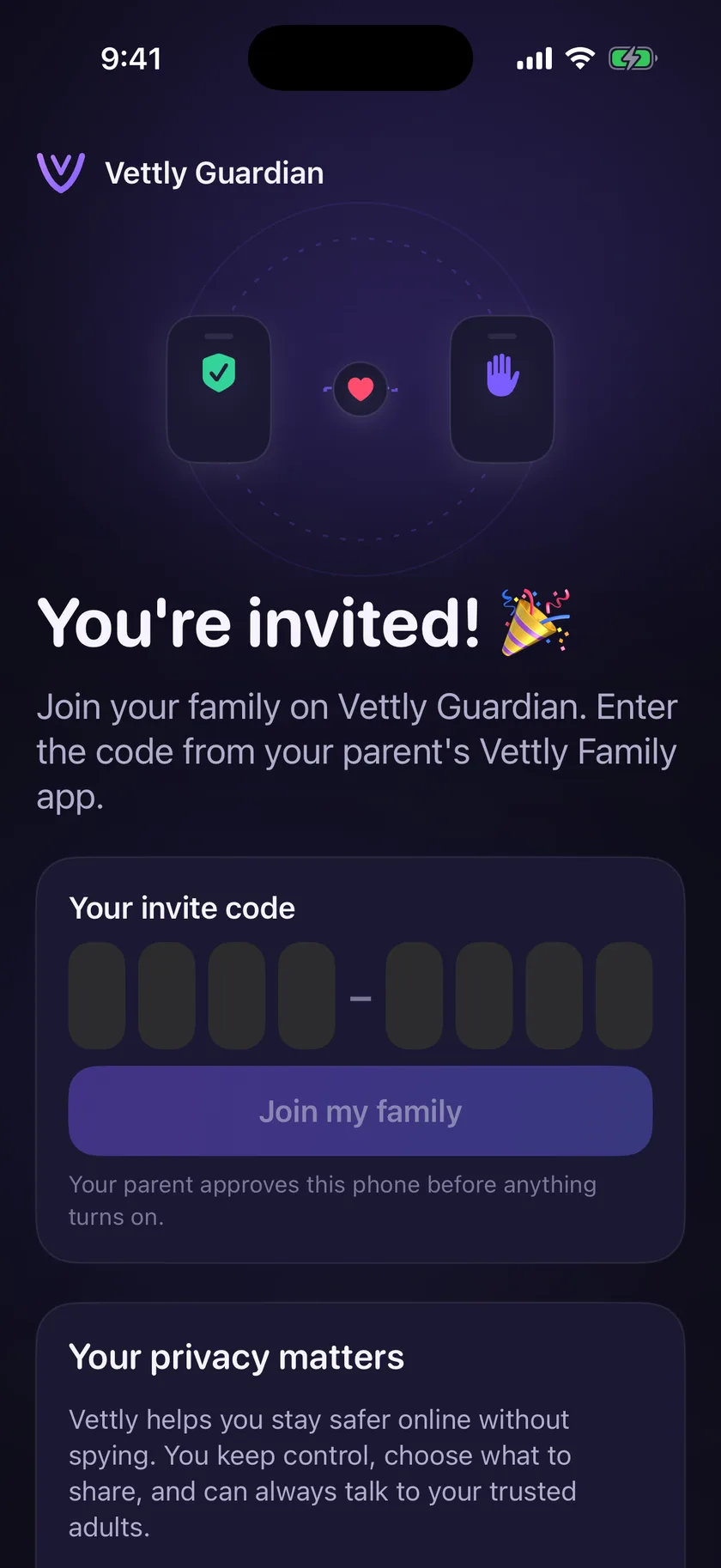
Vettly CompanionInvite. The teen enters the code from the parent’s Vettly Family app. 03
Both phonesReview coverage and permissions together.
Before anything is enabled, Companion shows what Vettly can and can’t see. Go through it together and agree on what is shared and what stays private.
On Android, your teen enables the on-screen text and notification permissions during a visible setup. On iPhone, Companion supports deliberate shares and help requests, and families can optionally add Mac Bridge for iMessage safety signals from a Finder backup they select. Connecting a TikTok or Instagram account is optional, and the account holder decides.
- You seeWhich sources are connected, what is working, and where the gaps are.
- Your teen seesThe same list, in their own app, and the option to say no.
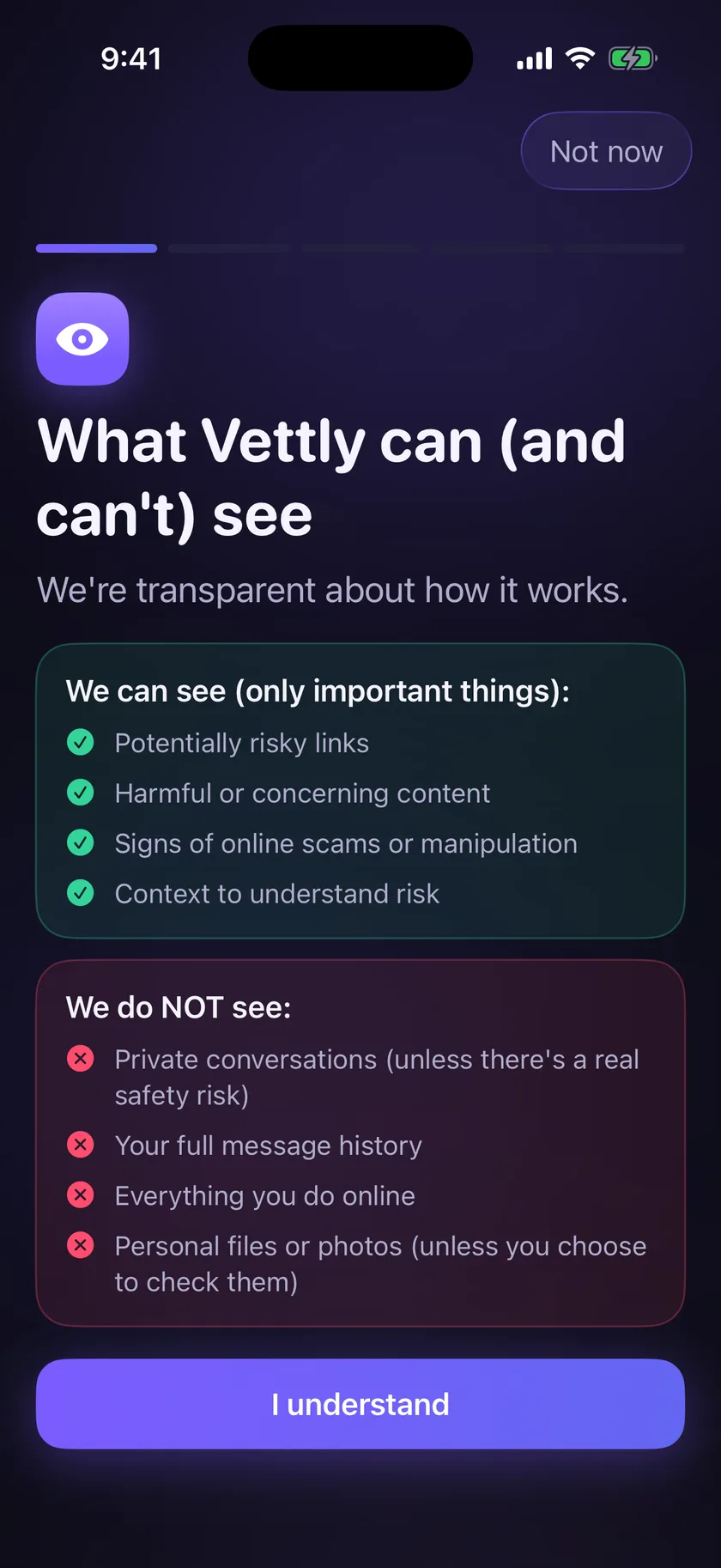
Vettly CompanionWhat Vettly can (and can’t) see. Shown to the teen before checks are enabled. 04
Your teen’s phoneTry a first check-in.
Companion gives your teen tools of their own: check a message, a link or a person, or ask Guardian for advice. Their checks stay private unless they choose to share one with you.
Send a test share together and watch it arrive, so you both know what to expect when something real comes up.
- You seeA share or help request only when your teen sends one.
- Your teen seesA plain-language read of a message, with the red flags explained and a reminder that they don’t have to handle it alone.
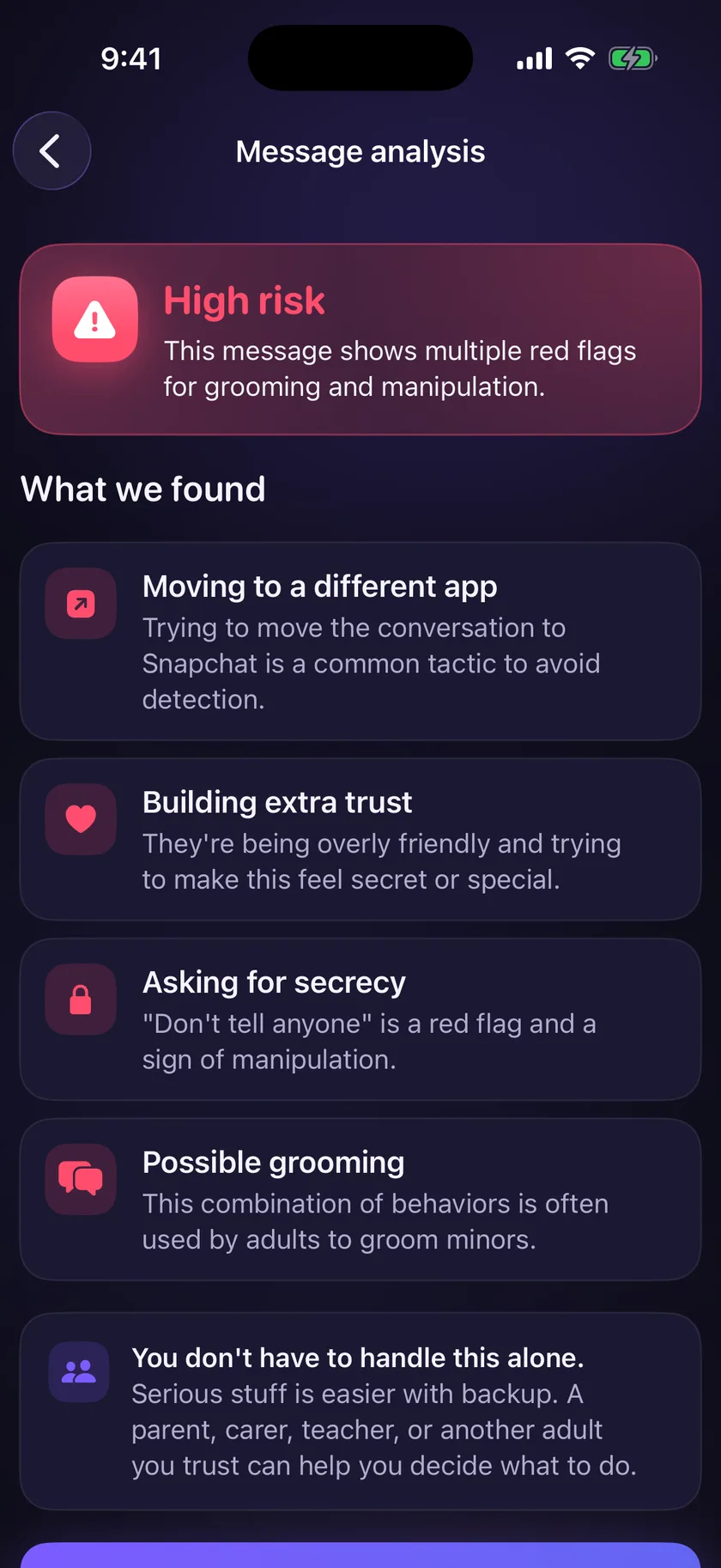
Vettly CompanionMessage check. The teen’s own check of a DM. It stays private unless they share it. 05
Your phoneWhen something matters, you get a Safety Moment.
Guardian looks for patterns across supported sources, not single words. When a pattern matters, you get one Safety Moment: what Guardian noticed, why it matters, and what to do next. You do not get a feed of your teen’s conversations.
- You seeThe concern, the context behind it, and clear next steps.
- Your teen seesNothing changes on their side without you starting the conversation.
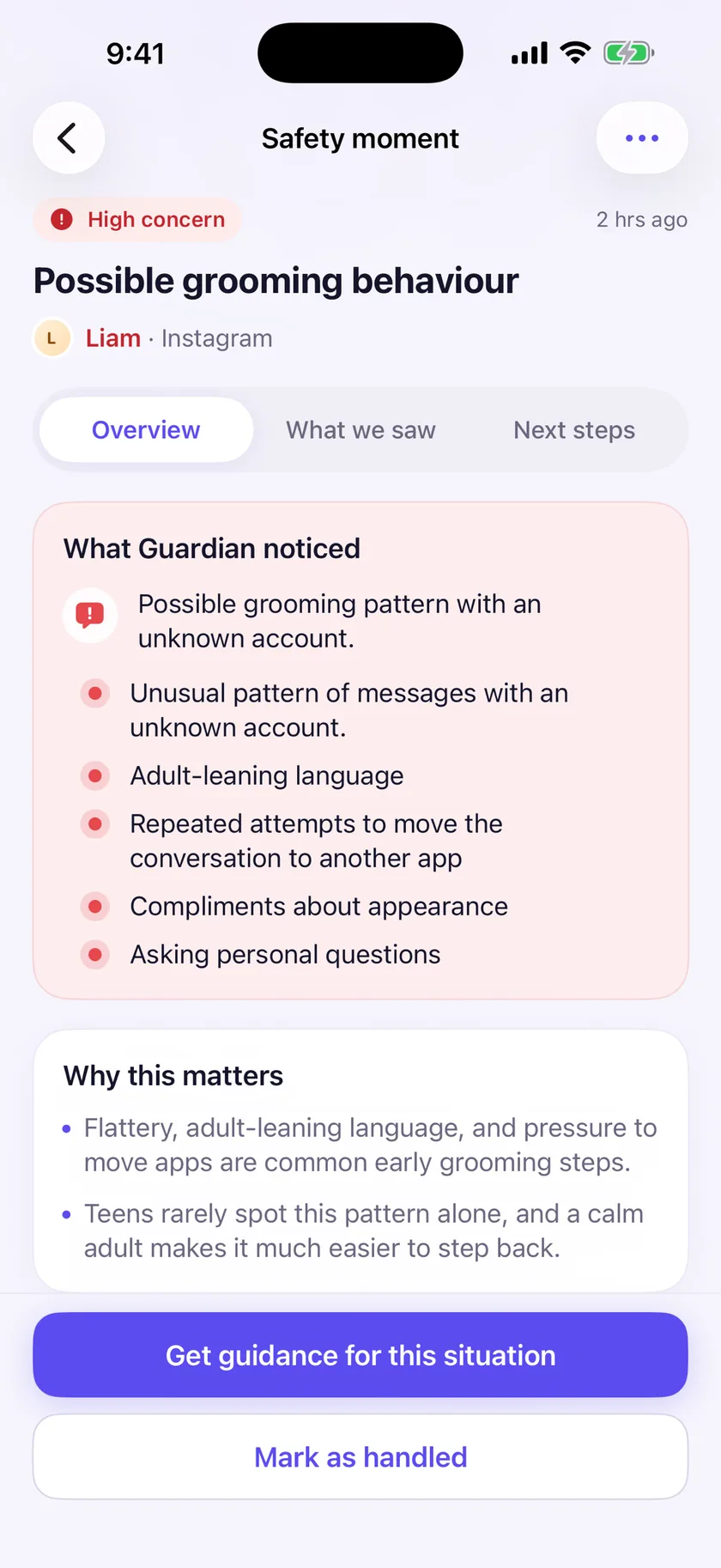
Vettly FamilySafety Moment. What Guardian noticed and why it matters. Sample data. 06
Your phoneA little help with the hard conversation.
Every Safety Moment comes with Conversation Coach: a calm opener, other ways in, and why the pattern matters. Start with connection and leave room for their side.
- You seeAn opener you can actually say out loud, and a fuller guide if you want it.
- Your teen seesA parent who heard about a pattern, not a transcript.
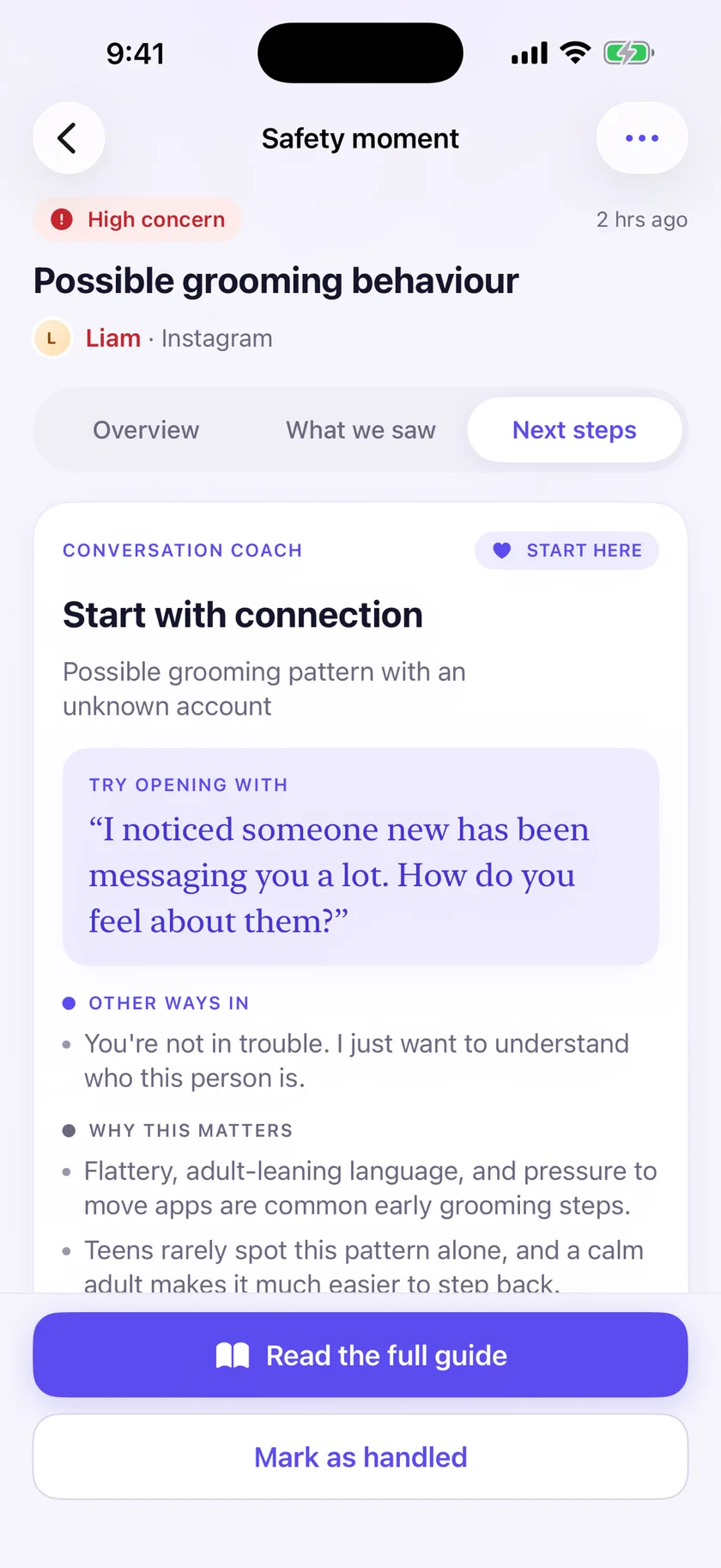
Vettly FamilyConversation Coach. A suggested opener and other ways in.
Visible by design
What each of you sees, and what no one gets.
you
In Vettly Family
- Each teen’s status at a glance.
- Safety Moments: what Guardian noticed, why it matters, and next steps.
- Conversation Coach openers for the hard conversations.
- Controls to unpair a device, change enabled capabilities, export data, or delete a profile.
your teen
In Vettly Companion
- Which checks are active, and what Vettly can and can’t see.
- Tools to check a message, a link or a person, or ask Guardian.
- Ways to share a concern, ask for help, or request a privacy pause.
- Connected accounts, and the option to disconnect them.
no one
Not part of Guardian
- A continuous feed of your teen’s conversations.
- Their password for any connected account.
- Direct messages through a connected TikTok or Instagram account.
- App blocking or screen-time limits.
Clear about the limits
What Guardian does not do.
Every phone is different, and no safety tool catches everything. Guardian shows which sources are connected, what is working, and where the gaps are.
- Mac Bridge is not live iMessage monitoring. It works from a Finder backup your family selects.
- Guardian does not cover Snapchat DMs or encrypted message content inside WhatsApp.
- A request to move apps may appear in a covered source while the new conversation stays outside coverage.
- Guardian never blocks your teen’s apps and does not set screen-time limits.
- Guardian is built to help you notice patterns and talk sooner. It is not an emergency service.
One simple plan
Try it free for 7 days.
Guardian Plus · $9.99 a month or $89.99 a year after the trial
One plan covers your whole family, up to five teens. Export your data, unpair devices, or delete your account at any time, with or without a subscription.
Questions parents ask
Straight answers, including the limits.
Does my teen know Guardian is on?
Yes. Your teen takes part in pairing and can see which checks are active in Companion. Guardian is visible by design and does not block their apps.
Do I get to read all their messages?
No. You receive focused Safety Moments with context and conversation guidance, not a feed of your teen’s conversations.
Does it work on iPhone?
Yes. Companion supports deliberate shares and help requests on iPhone. Optional Mac Bridge checks a Finder backup your family selects on a Mac for iMessage safety signals. It is not live iMessage monitoring.
Can we change or turn things off later?
Yes. Families can unpair devices, change enabled capabilities, export their data, delete a teen profile, or delete the account at any time, with or without a subscription.
Can my teen connect TikTok or Instagram?
Connecting an account is optional, and the account holder decides. Neither connection gives Vettly access to direct messages, and your teen can see what is connected and disconnect it at any time.
What ages is Guardian for?
Guardian is designed for families with teens ages 13–17. The current release does not create or target profiles for children under 13.
Keep reading
Before you set it up.
Android coverage
Which permissions a teen enables, which apps Guardian can check, and the limits that apply.
Privacy and visible monitoring
What is processed, what parents receive, and what your teen can see and control.
Parent guides
Grooming warning signs, sextortion, iPhone message safety, and parental controls that keep trust intact.